


Local SEO Tools
 If you own a local business, hopefully you know the basics of local search optimization by now…
Things like claiming and optimizing your business’ listings on Google and other local search sites, building citations, and getting positive reviews are a key part of a strong local search presence.
While these things do a lot of the heavy lifting in local search, there are plenty of other strategies out there that can give your local search efforts a boost.
Here are 3 under-the-radar local SEO tools we’ve been using for our clients (pay particular attention to #3…the most under-the-radar, and most intriguing, of the bunch).
1. Tracking Phone Number
Okay, I know this flies in the face of everything you’ve probably read about local search optimization.
All the advice tells you that everywhere your business’ name, address and phone number (also known as the NAP) appears on the web, it needs to appear EXACTLY as it does on your Google+ Local page.
Yes, having that consistency is a key factor in your local search rankings. But it has a major drawback…
…It makes it hard to track the results you’re getting from your local search optimization efforts.
And you want to track the results of your marketing, right? Right?!
Well, that’s not so easy with local search. There are a number of reasons why, but one of the biggies is that you can’t tell whether your local listings are making the phone ring.
So to try to better track calls from local search results, my team tested the use of a call tracking number. The main concern was that using a call tracking number would negatively affect rankings because it would mean a business’ NAP wouldn’t be consistent everywhere it appears online.
After a lot of testing, we found that using a call tracking number only has a small negative effect on rankings. And this can usually be overcome by creating additional citations over the long haul so we believe the benefits of call tracking outweigh any slight drop in the rankings. Here’s a great place to get started with citations.
Two key things to keep in mind when using a call tracking number for local search…
1. Be sure to use a local phone number with the area code your business is located in. We’re not trying to trick the search engines or prospects here, we’re just trying to better measure results…so don’t get a toll-free and/or spammy number.
 2. Use the same phone number for all your local search listings. We don’t recommend using one number for Google, another for Yahoo!, another for Bing, etc. While it’d be nice to know exactly which local search sites are producing the calls, using a different phone number for each would surely tank your local search listings.
But, wait! There’s another advantage to using call tracking…
Conversion Optimization
The data from this service has helped some clients improve their results.
Here’s how:
In the reporting for one client, we noticed they were getting a lot of inbound calls where the person hung up after just a few seconds. What we discovered by listening to the recordings of the calls is that their phone system didn’t give people the option of pressing 0 to get an operator.
So when someone called and the only option they heard was to enter an extension number, most people hung up. As soon as the company added an option to speak with an operator, the number of calls that lasted just a few seconds plummeted and leads increased.
You can also use the reporting to see patterns such as particular days/times that get high call volumes. For example, if you see that there are a lot of missed calls after hours, say between 6PM and 8PM, it may be worth hiring someone with a friendly voice to answer the phones during that time to get people’s contact information and let them know someone will get back with them the next day.
2. Yext
Yext does a lot of advertising so they may not truly qualify as “under the radar”. But we use their service for some of our local SEO packages and I wanted to share why.
Yext has one very big advantage that no other company I’m aware of offers. They have direct database access that lets you instantly update your business’ local search listings on over 40 key sites. While this doesn’t include Google, it does include other biggies like Yahoo! Local, Yelp, CitySearch, and Superpages.
It can take hours to update all your business’ local search profile pages by doing them one at a time. Being able to log into your Yext dashboard, make a change and have it get pushed out, almost immediately, to 40+ of your local business listings is a huge time saver!
Yes, there are other companies that allow you to update your information across multiple local search sites but it can often take weeks, if not months, for those updates to be reflected on your actual local search pages. With Yext, there’s no waiting!
This is particularly helpful if you have discounts/sales/offers that get updated frequently. One of my clients holds a huge sale every December. In the Yext dashboard, there a field where you can enter a special offer. On December 1, I’ll be entering the sale in that field and it will immediately get pushed out to the local search sites in Yext’s network.
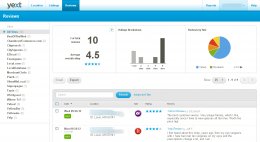
Yext also recently added a reputation management tab to their dashboard. This lets you see all the reviews that people have left for your company on all the local search sites Yext has access to. This is quite handy so you can keep track of what people are saying about you around the web from one place.
There’s just one negative in my mind about using Yext. It’s an annual service and, if you stop paying for it, all the profile data and enhancements you entered through Yext get removed from the local search sites Yext supplies data to.
My understanding is that it won’t remove your profile completely…your profiles will just revert to the state they were in before you started using Yext.
Despite this drawback, for many businesses, the annual fee is well worth it.
3. Single Platform
This is a relatively new and very intriguing player on the local search stage and the one I’m most excited about.


